


Solitaire Oasis
4.5426.00 Reviews
App Specs
- Version
- 2.0.2
- Updated On
- License
- Free
- Downloads
- 100,000+
- Developer
- FatMan Studio
- Categories
- Card
- Platform
- Android
Screenshots

 Analysis by AppCompare
When I judge a card game for inclusive everyday use, I look beyond whether a round is enjoyable: I want to know if its presentation is easy to follow, whether play suits different ways of interacting with a phone, and how well it fits into real-life breaks. Solitaire Oasis aims for a relaxed solitaire experience, and that calm framing is appealing, but it is worth separating what the game offers from what a player may need. I would approach it as a casual option to try, not as a game that is automatically comfortable for every ability or setting.
Who may enjoy this kind of solitaire
This is most likely to suit someone who already enjoys card puzzles and wants a low-pressure way to fill a short pause. Solitaire can be played at an individual pace, so there is no need to keep up with a teammate or react to a fast-moving match. That can make it a better fit than many competitive mobile games when you want to think through a move without feeling rushed.
It may also appeal to players who like a themed presentation rather than a plain digital deck. The oasis framing gives the game a clear mood, while the basic appeal remains familiar: arrange cards, consider the next move, and decide whether to continue. If you are new to solitaire, it can be a gentle point of entry, although familiarity with the rules of a particular variant will affect how quickly you settle in.
Reading the board and finding your way
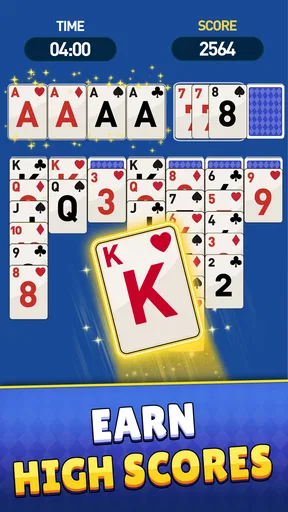
For a card game, readability matters more than decorative detail. You need to distinguish suits and values at a glance, keep track of piles, and notice which cards can be moved. A restful visual style can make a session feel less busy, but it should not come at the cost of card contrast or legibility. I would take a few minutes at the start to check the board on your own screen, especially if you often increase text size or use a smaller phone.
The practical test is not just whether the opening screen looks polished; it is whether you can follow a sequence of moves without losing your place. If cards or controls feel cramped, pausing between moves and looking over the full layout before tapping can help. That is useful in any solitaire game, but especially when a themed background adds texture behind the playing area.
Touch, pace, and sensory comfort
Card games place a steady demand on touch accuracy. Even a relaxed round can become frustrating if a small target is easy to miss or a gesture requires more precision than you have at that moment. I would try a few deliberate moves before settling into a longer session, and use whichever interaction feels more dependable if the game offers a choice. A slower pace is a real advantage here: there is usually room to think before acting, rather than relying on rapid taps.
Sound and motion are also personal. A soothing soundtrack may help some players unwind, while others prefer silence, particularly in a shared room or when listening to something else. If sound controls are available, setting them before a session is an easy way to make the game less intrusive. For anyone sensitive to animation or visual movement, it is worth noticing how transitions feel during actual play instead of assuming that a calming theme will necessarily be comfortable.
Worth Reading Before You Choose

EA SPORTS FC Mobile 26 Is a Bigger Football Game, but It Takes Time

Flipboard Shows What News Apps Must Do Beyond the Feed

Switching to Android Auto Means Rethinking Your Driving Routine

Google Calendar Makes a Crowded Week Easier to Manage

Ludo King Makes the Most of the Minutes Between Plans

Baby Panda World Brings Quick Play to Modern Phones, but Its Game Library Feels Busy
Where it fits in an ordinary day
I can picture opening a solitaire game while waiting for an appointment or taking a quiet break at home. The key is to treat it as a flexible pastime rather than something that demands a long, uninterrupted stretch. A brief round can occupy a pause, while a more involved puzzle may be better saved for a time when you are not also watching the clock or trying to hold a conversation.
That flexibility does not make every setting suitable. A bright outdoor spot can make screen details harder to see, and playing one-handed while carrying a bag is an easy way to mis-tap. If you rely on a particular phone setup, such as a stand or a preferred hand position, use it before deciding whether the controls feel comfortable. The game is only a useful break when the device and surroundings let you focus on the cards without strain.
A closer look at the experience
After considering how the game may fit different needs, I would still put the core question first: does its particular style of solitaire give you a reason to return? The best way to answer that is to look at the play itself, the atmosphere, and the trade-offs alongside the basic appeal of a quick card session.
First Impressions and Features
When I first downloaded the game, I wasn’t expecting much more than a simple card game. But oh boy, was I pleasantly surprised! Right off the bat, the app greets you with a sleek, calming design that honestly feels like a mini tropical getaway.
The game offers various solitaire variations, which keeps things interesting. Whether you’re a fan of Klondike, Spider, or FreeCell, there’s something here to keep you entertained. The graphics are crisp, and the animations are smooth, making every move feel satisfying.
Gameplay and User Interface
Let’s talk gameplay. The controls are intuitive, even if you’re a newbie to the world of solitaire. You can drag and drop cards with ease, or if you prefer, just tap. The game flows seamlessly, so there are no awkward pauses or glitches. It’s like the developers really thought about making this a chill experience.
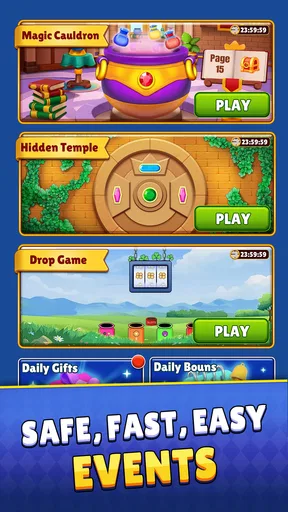
One of my favorite features is the daily challenges. It adds a layer of excitement and gives you something to look forward to every day. Plus, there are rewards! Who doesn’t love rewards? Completing challenges earns you coins that you can use to unlock new card designs and backgrounds.
A useful way to approach a challenge is to treat it as a prompt, not an obligation. If you have only a minute, a normal round may be a better fit than trying to finish a goal before you have to leave. If you do want to work toward a reward, take a moment to check what the challenge asks before you start; that avoids spending a session on a game that does not match your available time or mood.
Rewards can make repeated play feel more purposeful, but they can also shift attention from the puzzle to collecting items. I would decide up front whether you are playing for the card game itself or for customization. That small distinction helps keep a relaxing pastime relaxing, particularly if you prefer not to feel pushed into a daily routine.
Sound and Visuals
Now, let’s hit on the sound and visuals for a sec. The background music is gentle and soothing—think waves crashing softly on a beach. It’s perfect for unwinding after a long day. And if sound isn’t your thing, you can easily mute it in the settings.
Visually, the app doesn’t disappoint. The theme of an oasis is beautifully integrated throughout, from the palm tree icons to the sandy textures in the backgrounds. It’s all about that escape vibe, and it nails it.
There is a trade-off in any strongly themed card game: the atmosphere adds character, but the cards must remain the most important visual element. I would prioritize a design that makes suits and values easy for you to distinguish over a background you simply like. If you find a particular screen tiring, try changing the visual choice if the game allows it, then judge whether the board is easier to scan rather than choosing only by appearance.
Why It’s Worth Your Time
You might be wondering, "Why should I pick up another solitaire app?" Well, let me tell you, the game stands out because of its relaxing atmosphere and variety. It’s not just about playing cards; it’s about taking a mental break and enjoying some ‘me time.’
Another thing I appreciate is the app’s performance. It runs smoothly on both Android and iOS, without any crashes or bugs. Plus, it doesn’t drain your battery, so you can play worry-free.
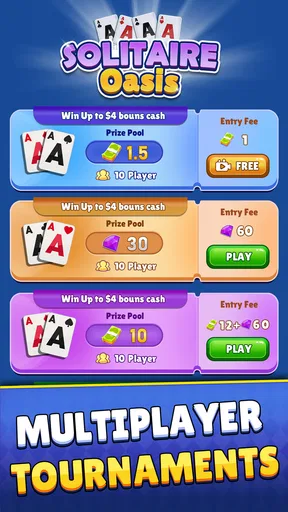
That smooth, unhurried style is also what separates it from a plain solitaire game that focuses only on the cards. If you want the quickest possible route into a familiar puzzle, a stripped-down alternative may be more convenient. If you want a calmer theme and reasons to revisit the game, the challenges and unlockable designs may make this one more appealing. Players seeking lively competition or a deep social layer should look elsewhere; this is best approached as a personal card-game break rather than a multiplayer event.
The game is free to start, and its age rating is Everyone. It is made by FatMan Studio, has an average rating of 4.3 from around 4.4 thousand ratings, and has passed 100 thousand installs. Those figures suggest that plenty of people have tried it, but they do not tell you whether its card size, pace, or visual style will suit your own needs. The sensible test is a short session on your device before deciding whether it belongs in your regular rotation.
It runs on Android 7.0 or later, and the current version is 1.1.6. There are in-app purchases, with items ranging from $2.99 to $99.99 each, so I would check the purchase screen carefully if you are considering optional extras or sharing a device with someone who might tap through prompts. You can enjoy the free entry point without treating customization as essential; the important question is whether the core play is satisfying to you.
Remaining barriers and sensible expectations
Even a casual card game can be inaccessible in practice if visual contrast, touch targets, or screen layout do not work for a particular player. I would not assume that a soothing theme solves those issues. If you have low vision, limited dexterity, or a strong preference for minimal animation, test a few moves in comfortable conditions and stop if you find yourself squinting, making repeated mis-taps, or feeling fatigued. A different solitaire app with a simpler board or controls may be a better choice.
It is also not ideal for every kind of break. If you need a game that can be interrupted constantly without losing your place, check how the current round behaves when you leave and return rather than relying on assumption. If you want multiplayer interaction as the main attraction, the casual card-puzzle format may not meet that need. And if you dislike reward loops or optional spending, focus on the basic game and avoid treating unlocks as a requirement.
For a practical first session, I would play somewhere with steady lighting, keep the phone supported, and try a few different card moves before starting a longer challenge. That lets you judge the important things—whether the cards are readable, whether touch feels reliable, and whether the pace suits you—without confusing the pleasant theme with the actual usability of the board. It is a small test, but it gives a more useful answer than judging the game from its opening screen alone.
Wrapping It Up
All in all, if you’re looking for a simple yet refreshing card game, Solitaire Oasis is definitely worth checking out. It’s got that perfect mix of relaxation and challenge, and it’s just a tap away. Whether you’re on a break at work or lounging at home, this app is like a little vacation in your pocket.
I would recommend giving it a try if you enjoy solo card puzzles, want a gentler alternative to fast competitive games, and like having a themed setting around familiar play. I would skip it if your priority is a highly social experience, if decorative visuals make card reading harder for you, or if you want a game with no optional purchases at all. A brief test round is the best way to decide whether it feels comfortable on your screen and in your routine.
So, what are you waiting for? Give it a go and let me know what you think. Happy gaming!
Pros
- Intuitive interface for easy navigation.
- Multiple game modes enhance replayability.
- Daily challenges keep gameplay fresh.
- Customizable card designs add personal touch.
- Offline mode available for uninterrupted play.
Cons
- Ads can be intrusive during gameplay.
- Limited hints without premium upgrade.
- No multiplayer option for competitive play.
- Occasional lag on older devices.
- In-app purchases can be pricey.
FAQs for Solitaire Oasis
What is Solitaire Oasis and how does it differ from other solitaire games?
Solitaire Oasis is a unique take on the classic solitaire card game, offering a refreshing desert-themed interface. Unlike traditional solitaire apps, Solitaire Oasis includes special features like daily challenges, customizable card decks, and scenic backgrounds. It also offers a more relaxing gameplay experience with soothing music and animations, enhancing the overall experience.
Is Solitaire Oasis free to play, or does it require in-app purchases?
Solitaire Oasis is free to download and play, but it does offer optional in-app purchases. These purchases can enhance your experience by unlocking premium features, such as additional card designs and ad-free gameplay. However, all core game features are accessible without spending a dime, allowing everyone to enjoy the game fully.
What are the system requirements for installing Solitaire Oasis on my device?
To install Solitaire Oasis on your Android device, you need to have Android version 5.0 or above. For iOS devices, iOS 10.0 or later is required. The app is optimized for both smartphones and tablets, ensuring a smooth gaming experience across different screen sizes. Make sure you have enough storage space available for the installation.
Does Solitaire Oasis offer any multiplayer or social features?
Solitaire Oasis is primarily a single-player game focused on providing a relaxing solitaire experience. However, it does include social features such as leaderboards and achievements, allowing you to compete with friends or other players worldwide. You can connect your game to social media accounts to share your progress and high scores.
How can I ensure my progress in Solitaire Oasis is saved and transferable to other devices?
To save and transfer your progress in Solitaire Oasis, you should connect the app to your Google Play or Apple Game Center account. This syncs your game data with the cloud, enabling you to restore your progress when switching devices. Make sure your internet connection is active when syncing to avoid any data loss.


